
‘Oplan Bantay Signal’ lets you report areas with slow mobile signal to the DICT

Does your subdivision or workplace suffer from a slow mobile signal? Do you know a place notorious for giving you zero cell bars (ehem, Festival Mall), then you might want to report it to the Department of Information and Technology (DICT). The DICT recently launched its Oplan Bantay Signal , where Filipinos are encouraged to report areas in the Philippines with slow mobile signal. This, hopefully, will help nudge service providers to improve and up their game. How it works is pretty simple. Filipinos are asked to run a network speed test and email the result to the DICT. How to report weak mobile coverage to the DICT You can follow the steps below: Download the Opensignal Internet Speed Test on the Google Play Store (Android) or Apple App Store (iOS). Turn off your WiFi and turn on the mobile data. Open the app and enable the location. Start the test and wait for the result. Take a screenshot of the result and email it to 1326@dict.gov.ph with this subject head format: ...

‘Oplan Bantay Signal’ lets you report areas with slow mobile signal to the DICT

Oplan-Bantay-Signal-NoypiGeeks

Does your subdivision or workplace suffer from a slow mobile signal? Do you know a place notorious for giving you zero cell bars (ehem, Festival Mall), then you might want to report it to the Department of Information and Technology (DICT).

The DICT recently launched its Oplan Bantay Signal, where Filipinos are encouraged to report areas in the Philippines with slow mobile signal. This, hopefully, will help nudge service providers to improve and up their game.
Oplan-Bantay-Signal

How it works is pretty simple. Filipinos are asked to run a network speed test and email the result to the DICT.

How to report weak mobile coverage to the DICT

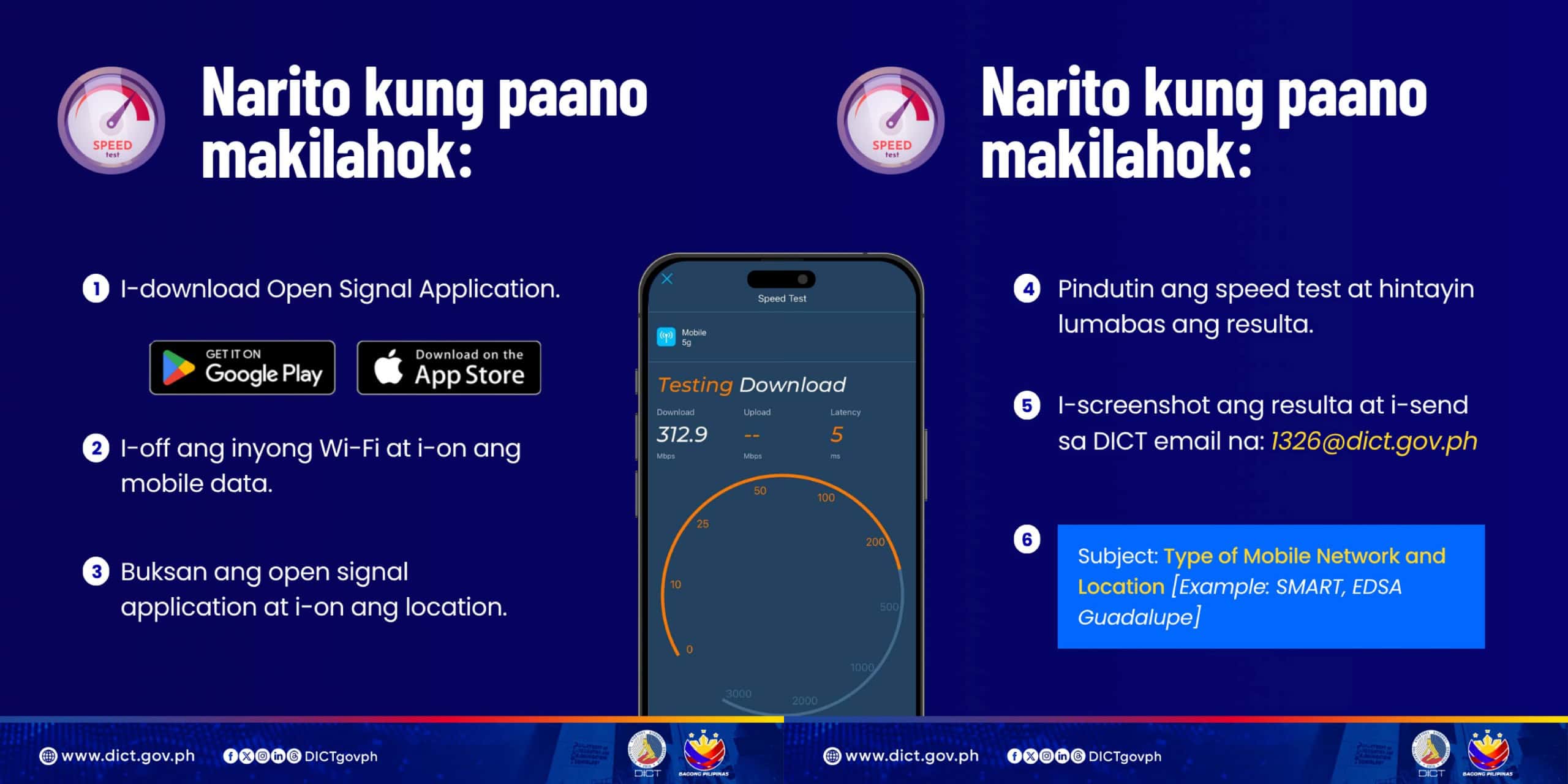
You can follow the steps below:

  1. Download the Opensignal Internet Speed Test on the Google Play Store (Android) or Apple App Store (iOS).
  2. Turn off your WiFi and turn on the mobile data.
  3. Open the app and enable the location.
  4. Start the test and wait for the result.
  5. Take a screenshot of the result and email it to 1326@dict.gov.ph with this subject head format: Mobile Network and Location (ex: Smart, EDSA Guadalupe).”
Oplan-Bantay-Signal-How-To-Report

DICT encourages everyone to participate and help them specify areas in the country with weak or no signal.

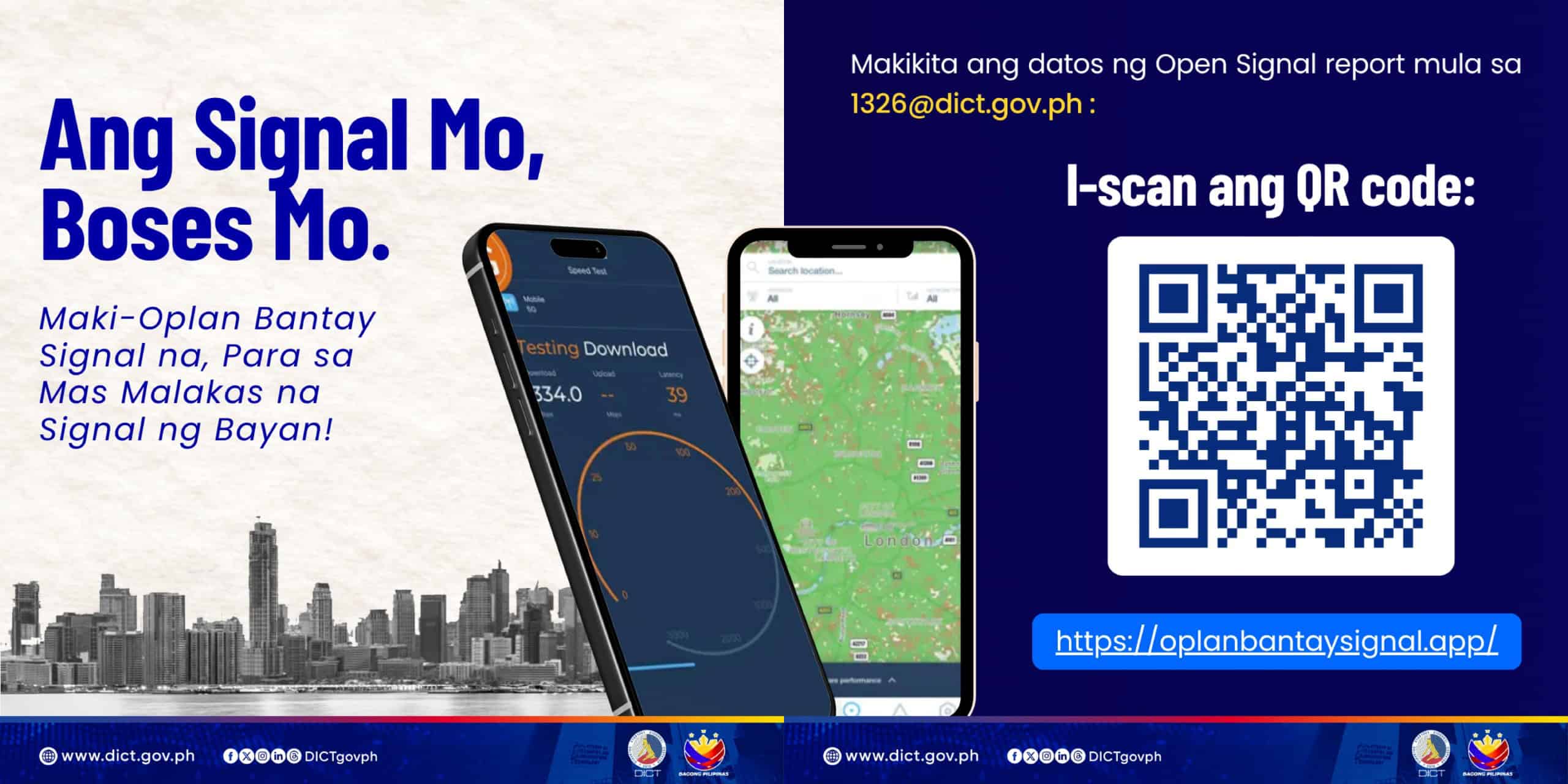
You can see a visual report from the program through the website https://oplanbantaysignal.app.

This article, ‘Oplan Bantay Signal’ lets you report areas with slow mobile signal to the DICT, was originally published at NoypiGeeks | Philippines Technology News, Reviews and How to's.


Comments

Popular posts from this blog

Globe Prepaid eSIM is finally available

At long last, Globe has finally released its Prepaid eSIM. The Globe Prepaid eSIM launched about 8 months after they first teased the service in August 2023, around 5 months since a prepaid eSIM was offered exclusively to travelers , and about 6 years since they offered eSIMs for postpaid users. If you own modern iPhones and other compatible devices and want to have a Globe eSIM installed on your phone without being tied to a postpaid plan, you can now do so by purchasing one on the GlobeOne app. Related How to check Globe load and data balance How to use Globe, TM to call telephone numbers The Globe Prepaid eSIM has a price of Php99 and comes with a free 5GB of data and unlimited texts to all networks valid for three days after registration. Sadly, no free calls. To purchase, simply open the GlobeOne app > tap Life Essentials > and under Get a Globe Connection, tap Prepaid eSIM. Key in your email address, where the QR code and installation instructions will be ...

HUAWEI Pura 70 Ultra takes the #1 spot in DXOMark’s smartphone camera ranking

The HUAWEI Pura 70 Ultra has made an impressive entrance into the camera phone market, securing the top position in DXOMark’s rankings. Scoring 163 points, it edged out the former leader, the HONOR Magic6 Pro , by a mere five points. It’s worth noting that HONOR was once a subsidiary of HUAWEI , and both companies continue to excel post-separation. DXOMark praised the Pura 70 Ultra for its superior camera capabilities, affirming Huawei’s expertise in delivering high-quality smartphone photography experience. The device achieved an outstanding score of 169 in photography and 148 in video. Its performance was particularly strong across various critical aspects, such as color accuracy, exposure, bokeh effects, and noise handling. The HUAWEI Pura 70 Ultra also performed exceptionally well in different lighting scenarios, including indoor, outdoor, and low light environments. It was highly rated in the ‘Friends & Family’ category, suggesting it’s an ideal choice for capturing i...

What does the “IP” rating on your smartphone mean?

If you look at your new phone’s specifications, you will notice something like “IP69 Water and Dust Protection.” This is a common selling point that phone manufacturers and brands show on their specifications. At first glance, it may appear too technical, but it’s actually straightforward. What does the IP code mean? The “IP” in the IP code stands for Ingress Protection, an internationally recognized standard defined by the International Electrotechnical Commission (IEC) that indicates the level of dust and water protection of a gadget, such as a mobile phone or other electronic device. As you notice, the letters IP are usually followed by a mix of numbers and/or letters, like ‘IP69’ or ‘IPX7,’ indicating their water and dust protection rating.  We already mentioned what IP stands for. Now, let’s look at the next two digits. What does the first digit mean? The first digit after IP indicates solid particle protection, including dust, wires, or body parts. It will range from ...